Tenant Isolation Approaches in Medplum

In healthcare applications, practitioners often work across multiple organizational boundaries. A doctor might work at multiple clinics, a nurse might be part of several care teams, or a care coordinator might manage patients across different healthcare services. Each of these—clinics, care teams, and healthcare services—represents a distinct tenant in your system: a collection of resources (patients, observations, encounters, etc.) that should be logically grouped together.
In Medplum, you can build your tenancy model around any FHIR resource type. Common examples include:
Organization: Different clinics, practices, or healthcare organizationsHealthcareService: Different departments or services (e.g., Cardiology Department, Oncology Department)CareTeam: Different care teams (e.g., Diabetes Care Team, Hypertension Care Team)
For a comprehensive guide on how to set up multi-tenancy in Medplum—including data modeling, compartments, propagation, and user enrollment—see our Multi-Tenant Access Control documentation.
This blog post focuses on a specific challenge: What happens when a user belongs to multiple tenants? And more importantly, how can you ensure your application restricts access to only one tenant at a time?
Understanding API-Level Security and Isolation
Before diving into the solutions, it's important to understand what API-level security and isolation means, especially for non-technical readers.
When a user logs into your application, they receive an authentication token (think of it as a digital key). This token is used to make requests to the Medplum API server to read or modify patient data, medical records, and other healthcare information.
API-level isolation refers to security controls that are enforced by the Medplum server itself—not just by your application's user interface. When properly configured, the server checks every request against the user's permissions and only allows access to data the user is authorized to see.
Why This Matters: The Security Risk
Here's the critical security concern: If a bad actor obtains a user's authentication token and knows how to construct FHIR API requests, they could potentially access data from all tenants that user has access to—even if your application's UI only shows one tenant at a time.
The risks include:
-
Unauthorized Data Access: An attacker with a stolen token could bypass your application's UI restrictions entirely and directly query the API to retrieve patient data from multiple tenants simultaneously.
-
Data Exfiltration: They could systematically extract sensitive health information (PHI) from all tenants the user belongs to, not just the one currently displayed in your application.
-
Compliance Violations: Accessing data across tenant boundaries could violate HIPAA, state privacy laws, or organizational policies that require strict data isolation between different clinics, departments, or care teams.
-
Cross-Tenant Data Leakage: Even if your UI correctly filters data, an attacker making direct API calls could discover relationships, patient overlaps, or other sensitive information that should remain isolated between tenants.
The key question: Does your security model rely solely on your application's UI to restrict access, or does the API server itself enforce single-tenant isolation?
This blog post explores different approaches to ensure that even if someone gets hold of an authentication token, the API server itself will restrict access to only one tenant's data at a time—providing true API-level security.
How to Ensure Your Application Can Be Contained to Just One Tenant at a Time When a User Belongs to Multiple Tenants
The Challenge: Multiple Tenant Memberships
When a Practitioner user belongs to multiple tenants, their ProjectMembership will have multiple entries in the access array, each with different tenant parameters:
In this scenario, the user's API-level access includes data from both clinics. But how do you ensure your application is contained to just one tenant at a time?
- Organization
- HealthcareService
- CareTeam
{
  "resourceType": "ProjectMembership",
  "access": [
    {
      "parameter": [
        {
          "name": "organization",
          "valueReference": {
            "reference": "Organization/clinic-a",
            "display": "Downtown Clinic"
          }
        }
      ],
      "policy": {
        "reference": "AccessPolicy/mso-policy"
      }
    },
    {
      "parameter": [
        {
          "name": "organization",
          "valueReference": {
            "reference": "Organization/clinic-b",
            "display": "Uptown Clinic"
          }
        }
      ],
      "policy": {
        "reference": "AccessPolicy/mso-policy"
      }
    }
  ]
}
{
  "resourceType": "ProjectMembership",
  "access": [
    {
      "parameter": [
        {
          "name": "healthcare_service",
          "valueReference": {
            "reference": "HealthcareService/cardiology-service",
            "display": "Cardiology Department"
          }
        }
      ],
      "policy": {
        "reference": "AccessPolicy/service-policy"
      }
    },
    {
      "parameter": [
        {
          "name": "healthcare_service",
          "valueReference": {
            "reference": "HealthcareService/oncology-service",
            "display": "Oncology Department"
          }
        }
      ],
      "policy": {
        "reference": "AccessPolicy/service-policy"
      }
    }
  ]
}
{
  "resourceType": "ProjectMembership",
  "access": [
    {
      "parameter": [
        {
          "name": "care_team",
          "valueReference": {
            "reference": "CareTeam/diabetes-care-team",
            "display": "Diabetes Care Team"
          }
        }
      ],
      "policy": {
        "reference": "AccessPolicy/careteam-policy"
      }
    },
    {
      "parameter": [
        {
          "name": "care_team",
          "valueReference": {
            "reference": "CareTeam/hypertension-care-team",
            "display": "Hypertension Care Team"
          }
        }
      ],
      "policy": {
        "reference": "AccessPolicy/careteam-policy"
      }
    }
  ]
}
Tenant Isolation Approaches: Comparison Table
| Approach | API-Level Isolation (Enrolled Tenants) | API-Level Isolation (Per Tenant) | Application-Level Isolation | Use Case |
|---|---|---|---|---|
| Option 1: All Tenants | Yes | No | No | Cross-tenant visibility acceptable |
Option 2: _compartment Parameter | Yes | No | Yes | Need UI-level tenant restriction acceptable, API level access to all enrolled tenants |
| Option 3: Multiple Memberships | Yes | Yes | Yes | Need strict API-level tenant isolation |
Column Descriptions:
-
API-Level Isolation (All Enrolled Tenants): Whether the API restricts access to only the tenants the user is enrolled in via their ProjectMembership.
-
API-Level Isolation (Per Tenant): Whether the API restricts a User's access to only one tenant at a time, even if the User is enrolled across multiple tenants.
-
Application-Level Isolation: Whether the UI restricts what's displayed to a single tenant.
Choosing the Right Approach
Choose Option 1 if cross-tenant visibility is acceptable and you want the simplest implementation.
Choose Option 2 if you need UI-level tenant isolation but want users to be able to switch between tenants without re-authenticating. This approach maintains API-level access to all tenants and is also able to restrict what's displayed in the UI to only a single tenant at a time. It is much easier to implement Option 2 than Option 3.
Choose Option 3 if you need strict API-level single tenant access for security or compliance reasons. This is the most secure approach but requires users to sign in separately for each tenant they need to access with a separate ProjectMembership.
Option 1: Allow Access to All Enrolled Tenants
Description: The user can view Patients and resources from all enrolled tenants simultaneously.
Implementation: No additional restrictions needed. The AccessPolicy already grants access to all enrolled tenants, and your application can display data from all tenants.
Use Case: This approach works well when cross-tenant visibility is acceptable or desired. For example, a care coordinator who needs to see all patients across multiple clinics they manage.
Option 2: Frontend-Level Restriction with _compartment
Description: Keep the ProjectMembership and AccessPolicy configuration the same, but add the _compartment search parameter to all frontend queries to scope results to a specific tenant. The _compartment search parameter may look familiar because it is used in the AccessPolicy critertia. We can also use _compartment on the query itself, in combination with the AccessPolicy criteria, to further restrict the data that is returned to the user to only the data for the currently selected tenant.
Implementation: At the application level, maintain state for the currently selected tenant, and append _compartment=<current_tenant_ref> to all search queries.
Example:
// User selects "Downtown Clinic" in the UI
const currentTenant = 'Organization/clinic-a';

// All queries include _compartment filter
const patients = await medplum.search('Patient', {
  _compartment: currentTenant
});

const observations = await medplum.search('Observation', {
  _compartment: currentTenant
});
Use Case: When you need UI-level tenant isolation but want to maintain API-level access to all tenants. This allows users to switch between tenants in the UI without re-authenticating, while ensuring the UI only displays data from the selected tenant.
Option 3: Multiple ProjectMemberships
Description: Create a separate ProjectMembership for each tenant. Each membership has its own AccessPolicy with a single tenant parameter, enforcing isolation at the API level.
Multiple ProjectMemberships is an advanced Medplum feature. ProjectMemberships are a crucial part of access control to the Medplum data store and determine what resources a user can read, write, or modify. Misconfiguring ProjectMemberships or AccessPolicies can result in Users being locked out of necessary resources or gaining unauthorized access to data.
Before implementing multiple memberships:
- Thoroughly understand AccessPolicies and how they work
- Test extensively in a development environment
- Consider consulting with Medplum support or the community if you're unsure ::
Implementation: Use the /admin/projects/:projectId/invite endpoint with forceNewMembership: true to create additional memberships for the same user.
With multiple ProjectMemberships, each membership grants access to only one tenant, ensuring strict API-level isolation:
- Organization
- HealthcareService
- CareTeam
Example:
- Organization
- HealthcareService
- CareTeam
// First membership - Downtown Clinic
await medplum.post('admin/projects/:projectId/invite', {
  resourceType: 'Practitioner',
  firstName: 'Jane',
  lastName: 'Smith',
  email: 'dr.smith@example.com',
  password: 'secure-password',
  membership: {
    access: [
      {
        policy: { reference: 'AccessPolicy/mso-policy' },
        parameter: [
          {
            name: 'organization',
            valueReference: { reference: 'Organization/clinic-a' }
          }
        ]
      }
    ],
    identifier: [
      {
        system: 'https://medplum.com/identifier/label',
        value: 'Downtown Clinic'
      }
    ]
  }
});

// Second membership - Uptown Clinic
await medplum.post('admin/projects/:projectId/invite', {
  resourceType: 'Practitioner',
  firstName: 'Jane',
  lastName: 'Smith',
  email: 'dr.smith@example.com',
  forceNewMembership: true,  // Required for creating additional membership
  membership: {
    access: [
      {
        policy: { reference: 'AccessPolicy/mso-policy' },
        parameter: [
          {
            name: 'organization',
            valueReference: { reference: 'Organization/clinic-b' }
          }
        ]
      }
    ],
    identifier: [
      {
        system: 'https://medplum.com/identifier/label',
        value: 'Uptown Clinic'
      }
    ]
  }
});
// First membership - Cardiology Service
await medplum.post('admin/projects/:projectId/invite', {
  resourceType: 'Practitioner',
  firstName: 'Jane',
  lastName: 'Smith',
  email: 'dr.smith@example.com',
  password: 'secure-password',
  membership: {
    access: [
      {
        policy: { reference: 'AccessPolicy/service-policy' },
        parameter: [
          {
            name: 'healthcare_service',
            valueReference: { reference: 'HealthcareService/cardiology-service' }
          }
        ]
      }
    ],
    identifier: [
      {
        system: 'https://medplum.com/identifier/label',
        value: 'Cardiology Service'
      }
    ]
  }
});

// Second membership - Oncology Service
await medplum.post('admin/projects/:projectId/invite', {
  resourceType: 'Practitioner',
  firstName: 'Jane',
  lastName: 'Smith',
  email: 'dr.smith@example.com',
  forceNewMembership: true,  // Required for creating additional membership
  membership: {
    access: [
      {
        policy: { reference: 'AccessPolicy/service-policy' },
        parameter: [
          {
            name: 'healthcare_service',
            valueReference: { reference: 'HealthcareService/oncology-service' }
          }
        ]
      }
    ],
    identifier: [
      {
        system: 'https://medplum.com/identifier/label',
        value: 'Oncology Service'
      }
    ]
  }
});
// First membership - Diabetes Care Team
await medplum.post('admin/projects/:projectId/invite', {
  resourceType: 'Practitioner',
  firstName: 'Jane',
  lastName: 'Smith',
  email: 'dr.smith@example.com',
  password: 'secure-password',
  membership: {
    access: [
      {
        policy: { reference: 'AccessPolicy/careteam-policy' },
        parameter: [
          {
            name: 'care_team',
            valueReference: { reference: 'CareTeam/diabetes-care-team' }
          }
        ]
      }
    ],
    identifier: [
      {
        system: 'https://medplum.com/identifier/label',
        value: 'Diabetes Care Team'
      }
    ]
  }
});

// Second membership - Hypertension Care Team
await medplum.post('admin/projects/:projectId/invite', {
  resourceType: 'Practitioner',
  firstName: 'Jane',
  lastName: 'Smith',
  email: 'dr.smith@example.com',
  forceNewMembership: true,  // Required for creating additional membership
  membership: {
    access: [
      {
        policy: { reference: 'AccessPolicy/careteam-policy' },
        parameter: [
          {
            name: 'care_team',
            valueReference: { reference: 'CareTeam/hypertension-care-team' }
          }
        ]
      }
    ],
    identifier: [
      {
        system: 'https://medplum.com/identifier/label',
        value: 'Hypertension Care Team'
      }
    ]
  }
});
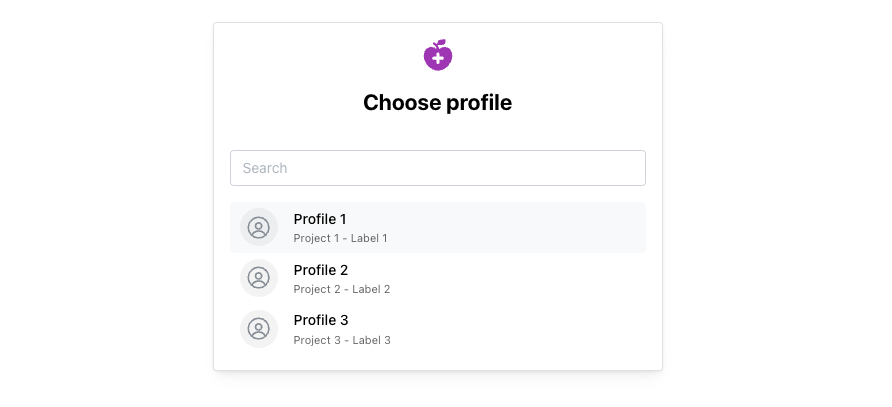
Sign-In Flow: When a user with multiple ProjectMemberships signs in, Medplum automatically prompts them to choose which membership to use for their session. Each membership can have a custom label (via the https://medplum.com/identifier/label identifier system) to help users distinguish between them.
Use Case: When you need strict API-level tenant isolation. This ensures that once authenticated, the user's API access is limited to only the selected tenant's data. This is the most secure approach and is ideal for scenarios where regulatory requirements or organizational policies mandate strict data isolation.